
How to Read a Fish Finder: A 7-Lesson Beginner Course
Never used a fish finder? Good. This course starts from zero. In seven short lessons you will learn what the screen is telling you, which settings matter, and how to turn what you see into fish on the line, whether you fish a Caribbean reef, a Chesapeake channel or a bass lake.
Take one lesson at a time. Each one ends with a two-line Remember box and a quick check question. Tick the lessons off below as you go; your progress is saved on this device.
Lesson 1What a fish finder is and how sonar works
A fish finder is an underwater ear. It sends a short burst of sound down into the water and listens for the sound bouncing back. That trick is called sonar (short for "sound navigation and ranging").8
It has two main parts. The display (the screen at the helm) and the transducer, the small unit mounted in the water, usually on the back of the boat (the transom), through the hull, or on a trolling motor. The transducer works like a speaker and a microphone in one: it turns electricity into sound, then turns the returning sound back into a signal the screen can draw.
Pings and echoes
Each burst of sound is called a ping. Sound travels through water at roughly 4,900 feet (about 1,500 meters) per second.8 The unit times how long the ping takes to go down and come back, and from that it works out the distance. That is how it knows the depth.1 It pings many times a second, so the picture keeps updating.
Anything that bounces sound back is called a return (or echo): the bottom, a fish, a school of bait, a rock, weeds, even air bubbles. Harder, denser things send back stronger returns.10
The cone
The sound does not go down in a thin line. It spreads out like a flashlight beam, in a shape called the cone. The deeper it goes, the wider it gets.10 So the unit "sees" a circle of bottom, not a single spot. A fish shown at 40 feet may be off to one side, not straight under you. A fish outside the cone is not shown at all.
Two words you will see everywhere
kHz (kilohertz) is the pitch of the sound: thousands of vibrations per second. Common fish finder frequencies are 50, 83 and 200 kHz.2 Lesson 5 explains which to use.
CHIRP means that instead of one single tone, each ping sweeps through a whole range of frequencies. That gives a sharper, more detailed picture and makes fish easier to pick out from the background.8,14
The transducer sends pings and listens for returns; the time it takes gives the depth.
It sees a cone that widens with depth, not a thin line straight down.
Quick check
Why might a fish on your screen not be straight under the boat?
Because the sonar sees a cone that gets wider with depth. The fish can be anywhere inside that cone, including off to one side.
Lesson 2The screen: depth, bottom and scrolling
The basic picture is called 2D sonar (or traditional sonar). The top of the screen is the surface. Going down the screen means going deeper. Most units show a depth scale along the right edge and a big depth number in a corner.
The screen scrolls right to left
The newest information is drawn on the right side. Older information slides off to the left.1 Think of it as a history strip. The left-to-right direction is time, not distance. If you stop the boat, the same bottom keeps getting drawn, so the screen keeps scrolling anyway.10
Colors
Color shows how strong a return is. On most default color schemes, warm colors like red and yellow mean strong returns, and blue means weak ones. Palettes vary by brand and setting, so find the color bar or legend on your own unit.
The bottom: hard or soft?
The bottom is usually the strongest line on the screen, and it runs as one continuous band all the way across. Fish and bait float above it with dark water in between. If a mark is joined to that band all the way across, it's bottom; if there's a gap, it's in the water (more in Lesson 3). Hard bottom, like rock, packed sand, shell or coral rubble, sends back a strong, bright return. It often shows a second return: a fainter copy of the bottom line at about twice the depth. That happens when the echo bounces off the surface and goes down a second time. Humminbird's manual says hard bottoms show a strong second return and soft bottoms a weak one or none.1 Soft bottom (mud, silt) looks duller and weaker.
A word of honesty: brands disagree about line thickness. Humminbird says hard bottom draws a thinner line; Deeper says a thicker line means harder bottom.1,11 A sloping bottom can also look soft.1 So trust color strength and the second return first, and compare with spots where you already know the bottom.
Surface clutter and thermocline
Surface clutter is the speckled band at the very top. It comes from tiny things near the surface, like air bubbles and algae.1 Wakes, waves, rips and churned-up water make it thicker and can streak it deeper.10
A thermocline is a layer where the water temperature drops quickly.12 In lakes in summer it can show as a faint band at the same depth across the screen.1 In shallow, wind-mixed tropical bays and reefs you usually won't see one. Offshore in deep water there is one, but it can be far down; one offshore captain told Sport Fishing he raises the gain to find it, usually around 200 to 300 feet, when fishing water over 2,000 feet deep.14
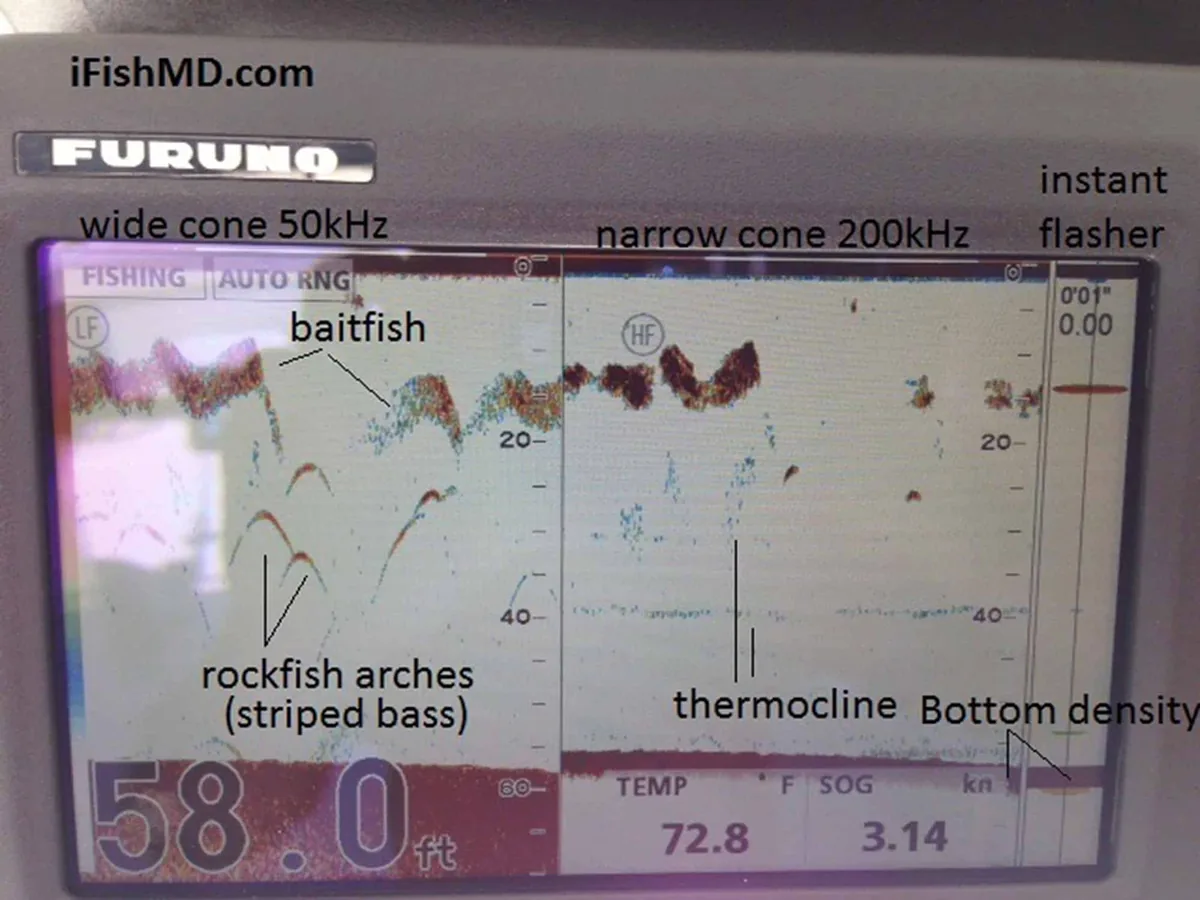
Newest is on the right; the screen shows time, not distance.
Bright bottom plus a second return at about twice the depth usually means hard bottom.
Quick check
You see a faint copy of the bottom at about double the depth. What does it tell you?
That's a second return. It usually means hard bottom, because hard bottom reflects sound strongly enough to bounce twice.
Lesson 3Fish, bait and arches
The hardest part for most beginners is telling three things apart: bait, fish and the bottom. This lesson is all about that. Here they are side by side, plus the things that fool people.
How to tell them apart
| Mark | Shape | Size | Where in the water | Does it move? | Color strength |
|---|---|---|---|---|---|
| Bait ball | Cloud or blob of many dots | Often bigger than any single arch | Often suspended mid-water; can be near the surface or the bottom | Yes: changes shape and depth | Mixed; densest part strongest |
| Single fish | Arch, half arch, or a line if you're anchored | Small, separate mark | Anywhere; often near structure, bait or the bottom | Yes: each pass is different | Strong core with weaker edges |
| Bottom | Continuous band across the whole screen | Widest, thickest mark | Lowest real mark (a second return below it is an echo) | No: it's always there | Usually the strongest |
| Weeds / grass | Fuzzy upright strands | Small to large patches | Attached to the bottom | Stays in place | Weaker than the bottom |
| Surface clutter | Speckles | Band across the top | Top few feet | Changes with waves and wakes | Weak to medium |
| Thermocline | Faint flat band | Across the whole screen | Same depth all the way across | Holds its depth | Weak |
The key questions: Is it connected all the way across? That's the bottom. Is there dark water between it and the bottom? Then it's in the water column: bait or fish. One curved mark, or a cloud of dots? Fish, or bait.
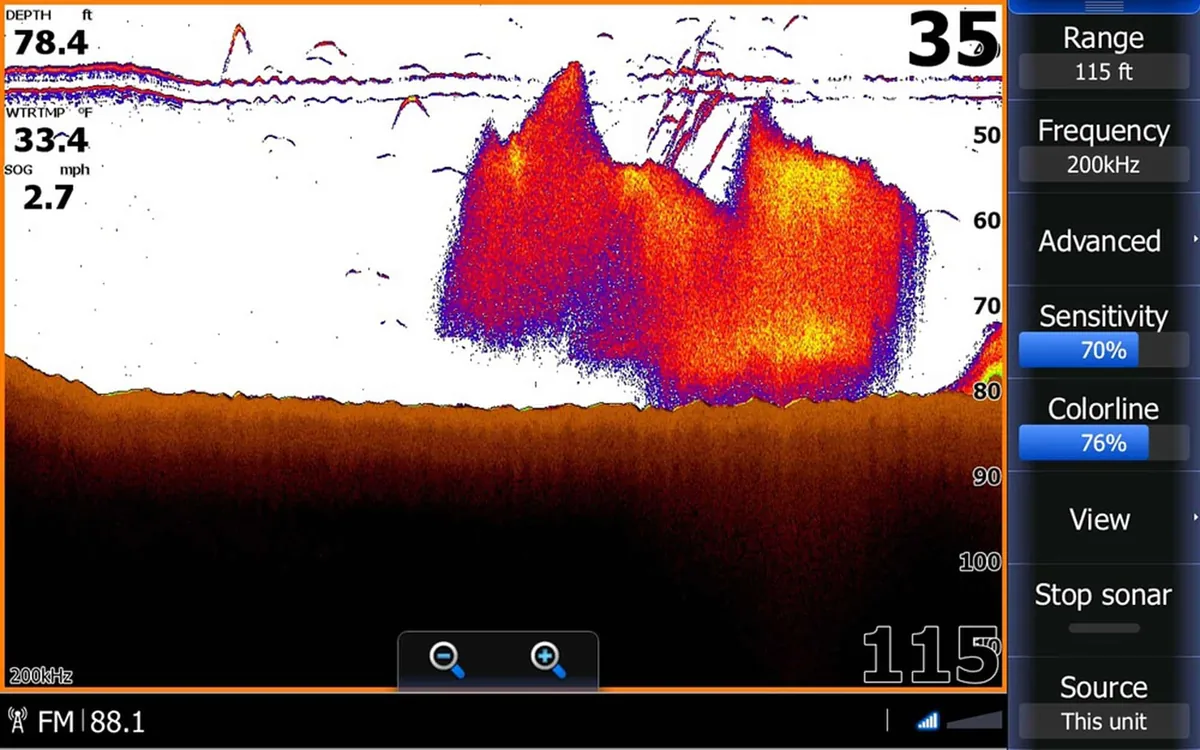
Single fish = arches
On 2D sonar a single fish usually shows up as an arch: a curved mark shaped like an upside-down U.13
Why fish make arches
As the boat passes over a fish, the fish enters the edge of the cone, where it is farther from the transducer. Then it is closest when it is right under you, and farther again as it leaves. The screen draws those changing distances, and the result is an arch.1
Full arches, half arches and lines
- Full arch: the fish passed all the way through the cone.
- Half arch (or a thick dash): the fish only crossed part of the cone, for example along the edge.10
- A straight line instead of an arch: if both the boat and the fish are still, for example when you are anchored, the distance never changes, so the fish draws a flat line.10
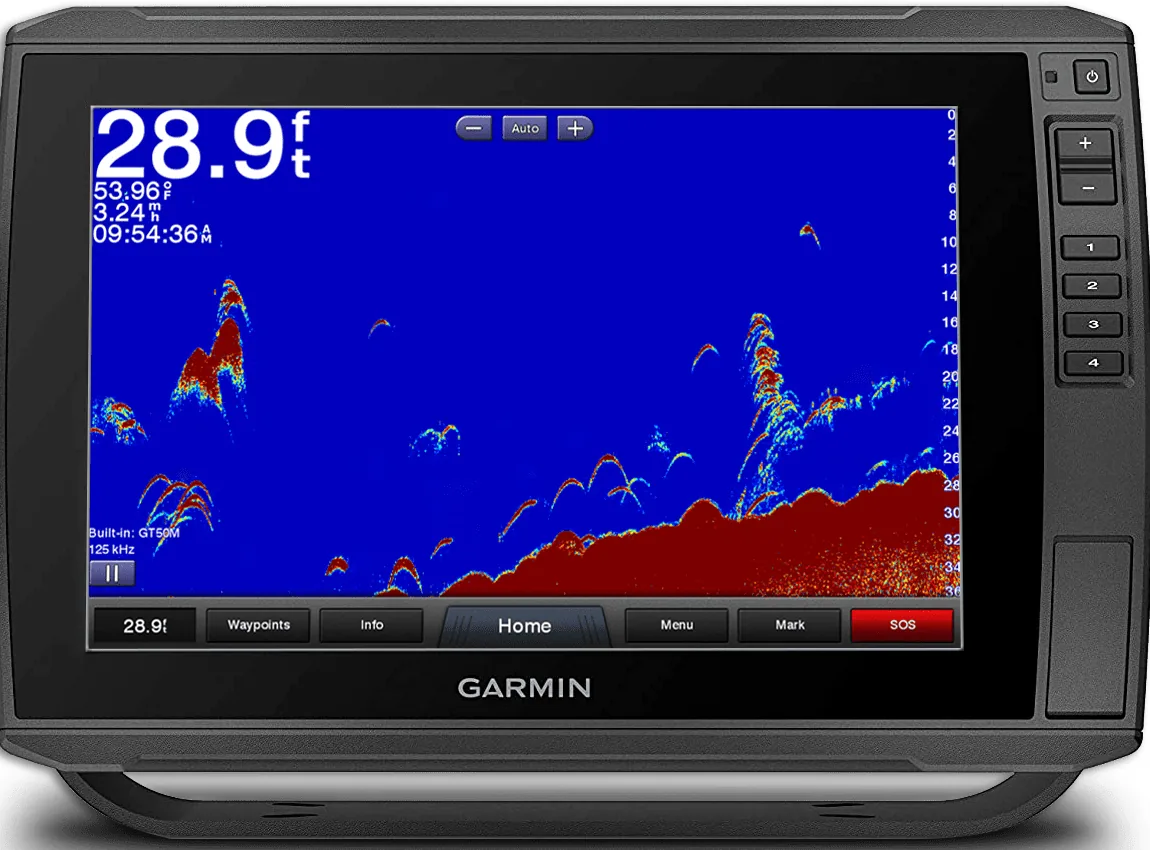
How big is it?
The length of an arch mostly shows how long the fish stayed in the cone, which depends on your speed, not its size.17 Deeper fish draw longer marks because the cone is wider down there.10 Thickness gives a better hint about size.10,17 Even so, a sunken stick or a can can make an arch too.17
Bait
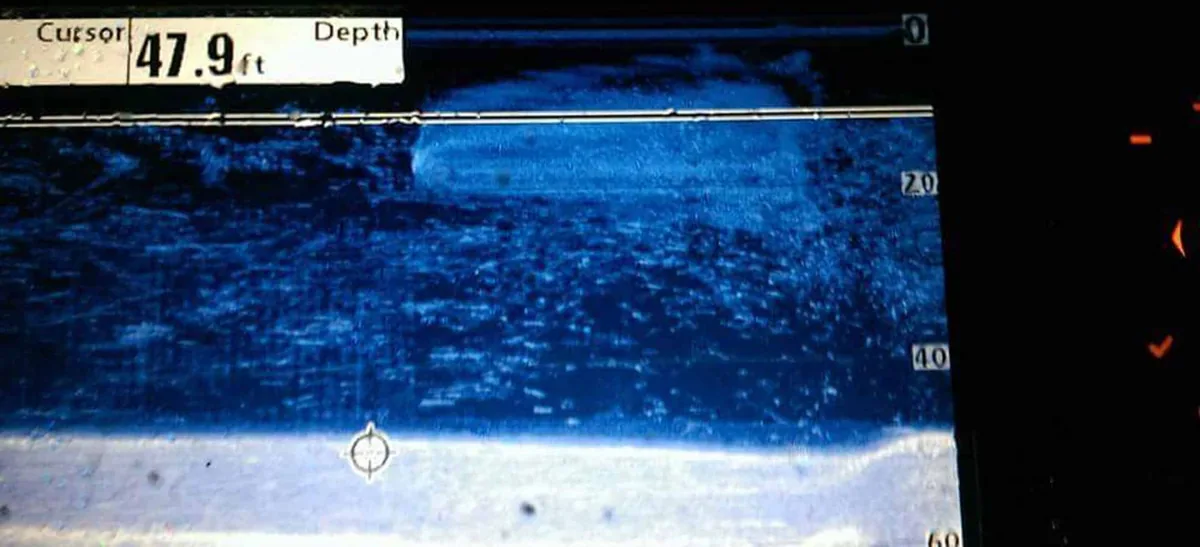
Baitfish schools show as clouds or balls of many dots, often yellow or orange on color screens.22 On Down Imaging, bait looks like a wispy cloud.19 Gamefish often show as arches near the edges or below the bait.
Things that fool beginners
- Surface clutter: the speckles in the top few feet are bubbles, algae and waves, not fish.1
- Turbulence: a wake, a rip or your own prop wash can send streaks of clutter down from the surface. If it starts at the surface and comes and goes with the waves, it's probably bubbles.10
- Thermocline: a faint band at the same depth all the way across. It's a temperature layer, not a school.1
- Weeds and grass: fuzzy strands standing up from the bottom that stay in place.22
- Bait or fish hugging the bottom: they can blend into the bottom line. Look for a fuzzy lump sitting on top of the line that's there one pass and gone the next. Zoom or bottom lock (Lesson 5) helps pull them apart.6
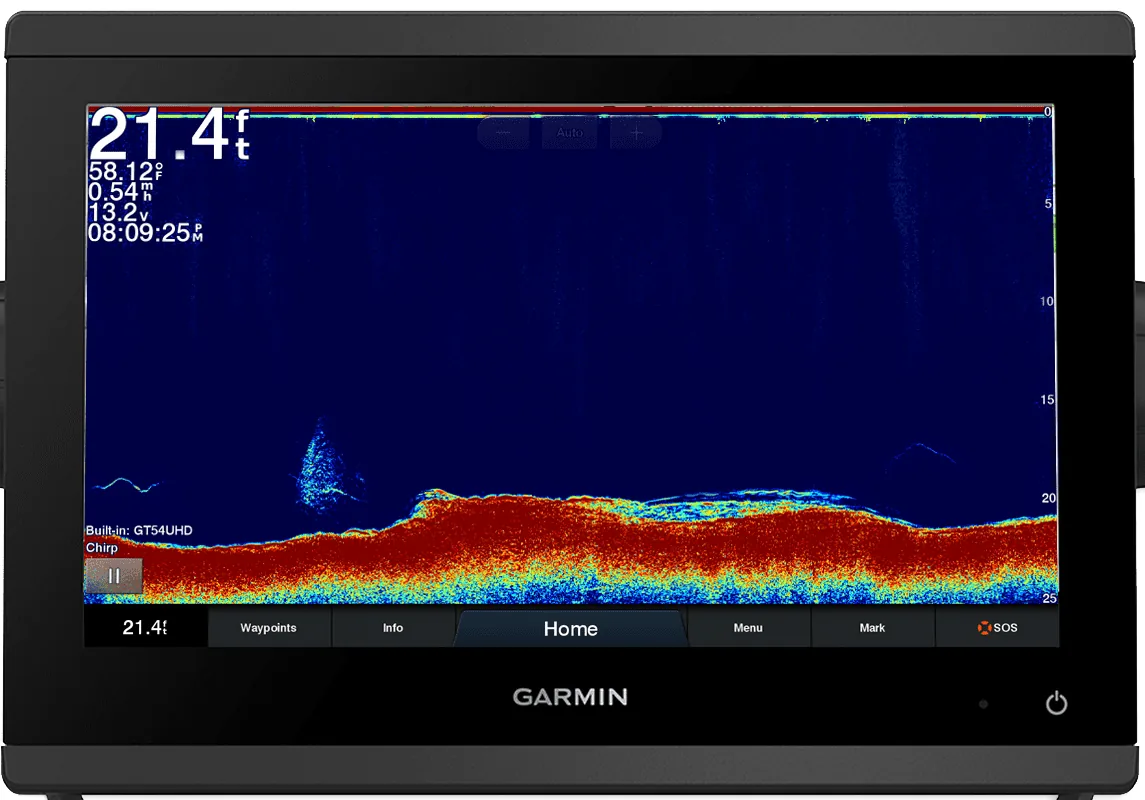
Fish symbols (Fish ID)
Many units can turn returns into little fish icons. Garmin calls this Fish Symbols; Humminbird calls it Fish ID+.5,1 It's handy for a quick look, but it can call weeds, brush or bait a "fish," and it can miss real fish. That's why most experienced anglers turn it off and read the raw screen.18 Try switching it on and off over the same spot to learn what real fish marks look like.
Guess the mark
Name each lettered mark, then open the answer.
Screen 1: what are A, B and C?
A is a bait ball: a dense cloud of dots with dark water underneath. B is a single fish (a full arch), likely a predator near the bait. C is the bottom: one continuous band all the way across.
Screen 2: what are A and B?
A is bait or fish hugging the bottom: a fuzzy, dotted lump sitting on top of the bottom line. B is a hard hump in the bottom itself (rock or reef): solid, bright, and part of the continuous line. Bottom lock or zoom would separate A from the bottom.
Screen 3: what are A and B?
A is weeds or grass: soft, upright strands attached to the bottom. B is a fish: a separate arch in open water.
Screen 4: what are A, B and C?
A is surface clutter. B is a thermocline: a faint, flat band at one depth across the whole screen. C is a fish, holding just above the thermocline.
An arch is one fish moving through the cone. Anchored, the same fish draws a line.
Arch length shows time in the cone, not fish size.
Quick check
You're anchored and see long straight lines in mid-water. Fish or not?
Most likely fish. With the boat still, a fish holding under you stays the same distance away, so it draws a line instead of an arch.
Lesson 4Structure: reefs, wrecks, rocks and drop-offs
Structure means anything that changes the bottom: reefs, rocks, wrecks, ledges, drop-offs and grass beds. Fish use structure for food and shelter, so finding it is half the job.1
How each one looks on 2D sonar
- Rocks and reef: a bumpy, broken bottom line with bright colors. Humminbird describes rocky bottom as having "a broken, random appearance."1
- Wreck: a sudden, tall, irregular shape rising off an otherwise flat bottom, often with a cloud of bait or fish marks above or beside it. Salt Water Sportsman captains describe idling slowly and watching for that cloud of marks.16
- Ledge or drop-off: the bottom line steps down sharply. Fish often hold right along the edge. In the Caribbean, the big one is the shelf edge, where shallow water falls off into deep blue water.
- Grass and weeds: soft, fuzzy growth standing up off the bottom, usually in weaker colors, with the real bottom line still visible underneath.22
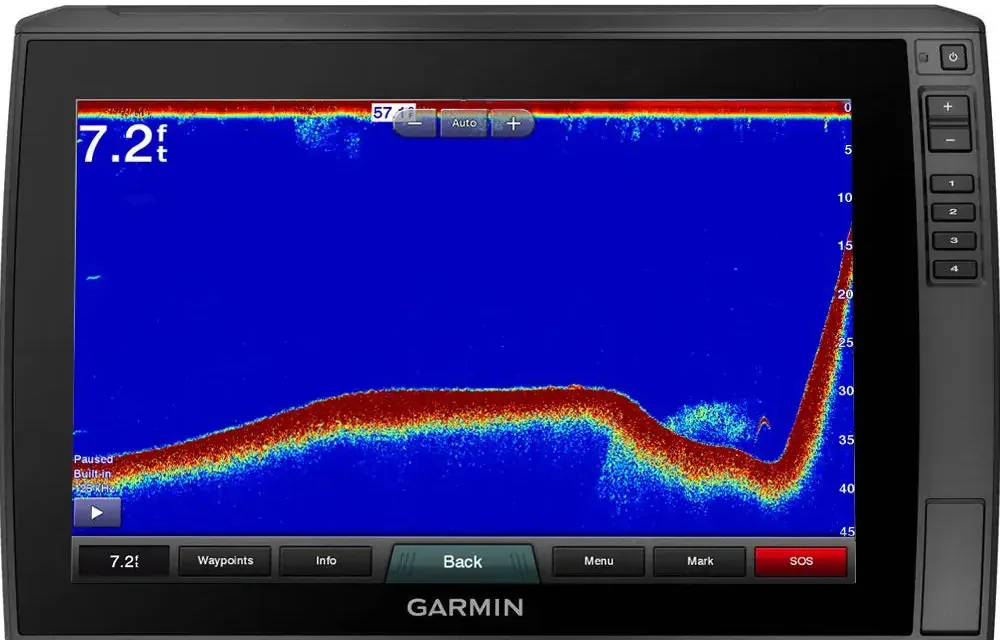
Look back at the 2D screen in Lesson 2: the bumpy section in the middle is rocky structure, with two small arches (fish) sitting just above it.
Shapes stretch and squeeze
Remember from Lesson 2 that the screen shows time, not distance. If you idle slowly over a reef, it looks long and gentle. Run over it fast and the same reef looks short and steep. Hold a steady speed when you search, so shapes stay honest.
Cross it twice
Pass over a spot from two different directions. Raymarine recommends this for imaging sonar to reveal edges and overhangs, and it helps on 2D too.9 When you find something good, mark a waypoint right away (Lesson 7 explains how).
Structure is any change in the bottom, and fish live on it.
Rocks look broken and bright; wrecks pop up sharply; ledges step down.
Quick check
A flat sandy bottom suddenly shows a tall, jagged spike with marks above it. What is it likely to be?
Probably a wreck or a rock pile, a piece of structure holding fish. Mark it and pass over again from another direction.
Lesson 5The settings that matter
Start in auto mode. Many modern units do a good job with few changes.13 Then learn one setting at a time. Menu names differ by brand, so use your own manual for the buttons.
Gain (sensitivity)
Gain decides how much the unit boosts weak echoes. Too high and the screen fills with "snow." Too low and you miss fish.19 To tune it by hand, raise it until a light speckle appears, then back off a little.9,22
Range
Range is how deep the screen shows. Auto range keeps the bottom on screen. If you want to see a second return, the range has to reach past twice the depth.
Chart speed (scroll speed)
This sets how fast the picture moves across the screen. A faster speed shows more detail when you're moving or trolling; a slower one keeps history on screen longer.7 In deep water each ping takes longer to come back, so the picture moves slower.14 If arches look squashed or smeared, adjust it.
Zoom and bottom lock
Zoom enlarges part of the water column. Bottom lock locks the view to the bottom so fish sitting just above it separate from the bottom line.6 Split zoom shows the zoomed view beside the normal one.
A-scope or flasher
An A-scope is a live vertical bar along the right side that shows what's in the cone right now, with no scrolling history.5,10
Fish symbols
Turn them off while you learn (Lesson 3).
Frequency: wide and deep, or narrow and sharp
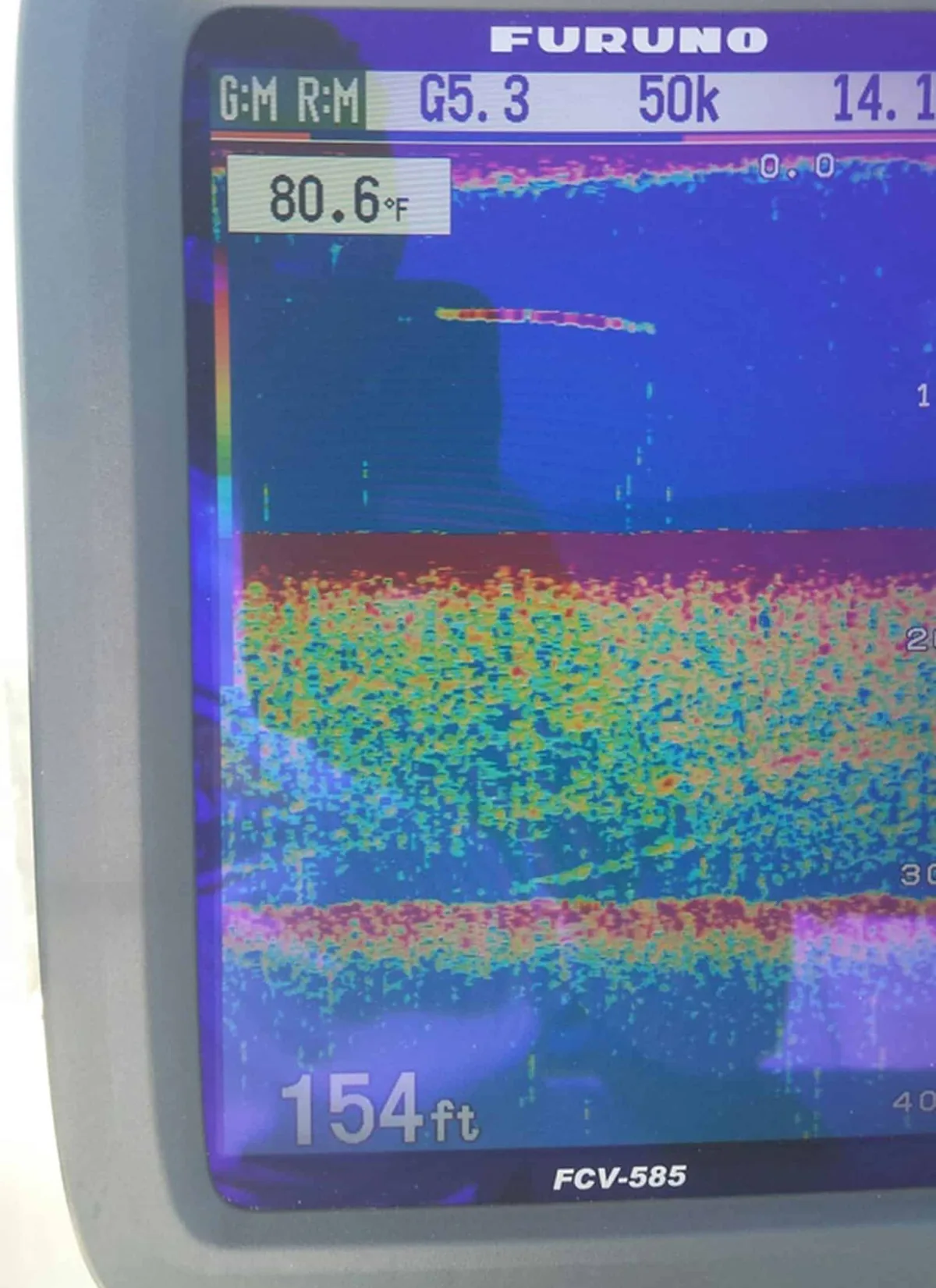
For example, one Humminbird dual-beam unit used a 20° cone at 200 kHz and a 60° cone at 83 kHz.1 At 100 feet down, simple geometry says a 20° cone covers a circle about 35 feet across, and a 60° cone about 115 feet across. With CHIRP, these become frequency bands, roughly 28 to 75 kHz (low), 80 to 135 (medium) and 130 to 210 or higher (high).14,15 Salt Water Sportsman points inshore anglers to a high band for bays, inlets and coastal water, and deep offshore anglers to low bands.15 You can see the difference on the real Chesapeake Bay screen in Lesson 2: the wide 50 kHz side shows more fish than the narrow 200 kHz side.
Start on auto; change one setting at a time.
Gain up until speckles show, then back off; high frequency for shallow detail, low for deep.
Quick check
Your screen is full of speckles from top to bottom. What do you change first?
Turn the gain (sensitivity) down a step or two until the background clears but fish and bait still show.
Lesson 6Down Imaging, Side Imaging and live sonar
Many units add imaging sonar. It uses very high frequencies, often several hundred kHz (for example 455 or 800 kHz on some Humminbird units),2 and thin beams to draw a picture that looks almost like a photo of the bottom. Brands use different names: Down Imaging, DownScan, DownVü or DownVision; Side Imaging, SideScan, SideVü or SideVision.
Down Imaging
This shows what's directly under the boat in sharp detail: trees, rocks, wrecks. Fish usually show as white dots, streaks or clouds. Light shades mean dense, hard targets; dark shades mean soft bottom or bottom falling away.3 It's great for telling a rock pile from a brush pile.9
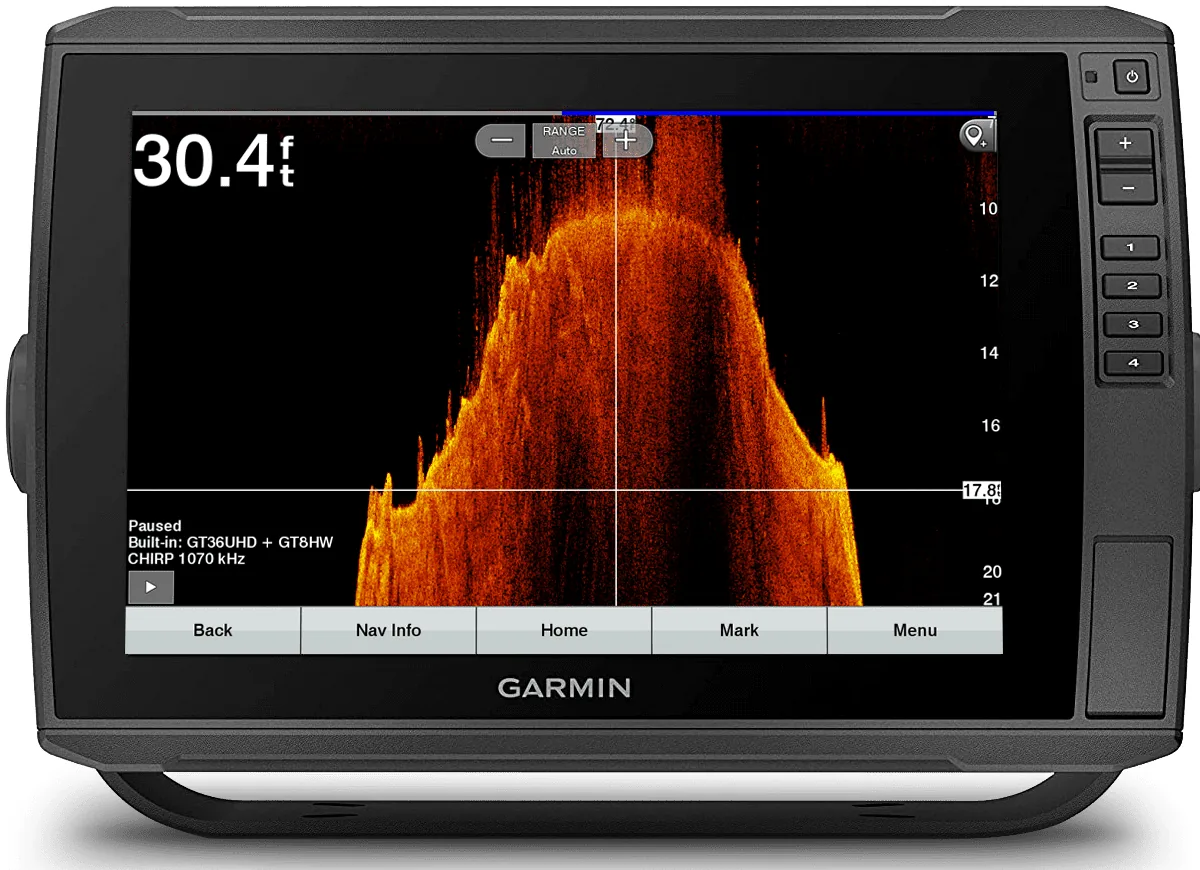
Side Imaging
- The line down the middle is your path. Left on the screen is left of the boat; right is right.20
- The dark strip in the center is the water column, where the sound hasn't reached bottom yet. It's roughly as wide as the water is deep.20
- How far an object sits from the center line shows how far to the side it is. Use the range markings on your screen.
- Shadows are your friend. A longer shadow means a taller object. A fish with a gap between it and its shadow is up off the bottom.3
- Fish show as small bright specks.20
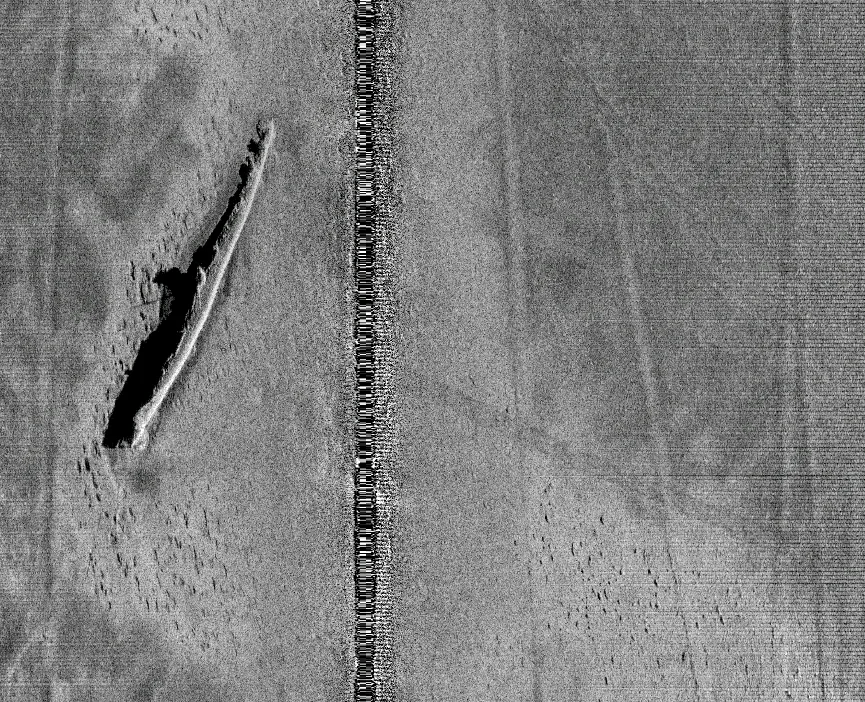
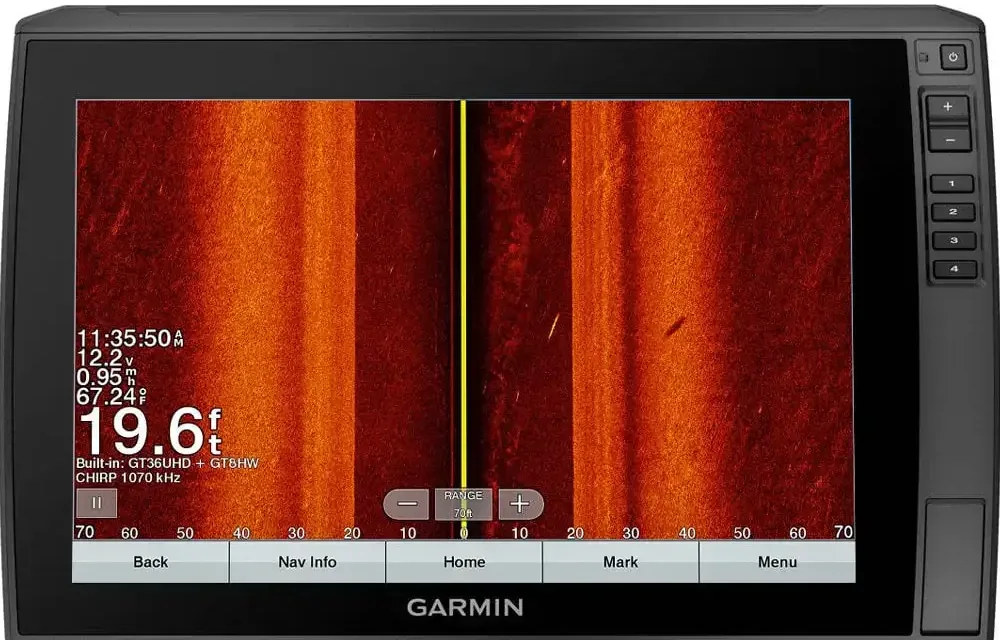
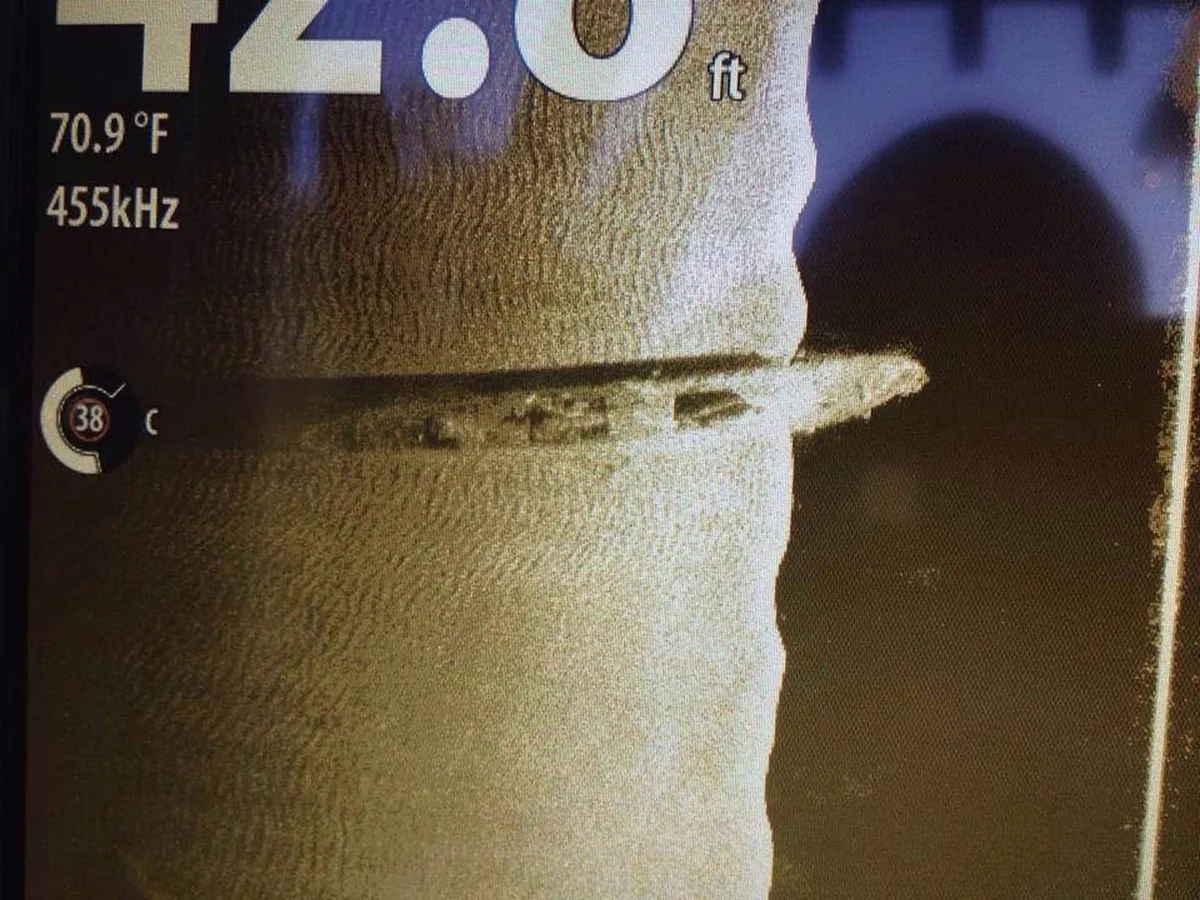
Limits. Imaging is weaker at telling fish apart from each other than 2D. It barely shows what's straight under the boat (that's the dark strip). Turns and speed changes distort the picture, so hold a steady speed. Raymarine suggests about 2 to 4 knots.9 Shorter range shows more detail.19
A brief word on live sonar
Live sonar (also called forward-facing sonar) shows what's in its beam in real time, like an ultrasound. You can watch fish swim and react to your lure. It's usually mounted on a trolling motor or a pole.21 Examples include Garmin LiveScope, Lowrance ActiveTarget and Humminbird MEGA Live.8,21 It's powerful but costs more and takes practice. Master 2D first.
Down Imaging shows what's under you; Side Imaging shows left and right from above.
Long shadow means tall object; a gap between a fish and its shadow means it's off the bottom.
Quick check
On Side Imaging, why is there a dark strip down the middle?
That's the water column under the boat. The sound hasn't reached the bottom yet, so nothing is drawn there.
Lesson 7On the water: finding fish in the Caribbean and fishing what you see
Now put it together. Before you leave, check the chart, the weather and the local rules. Marine reserves and seasonal closures apply in Puerto Rico and across the region, so know where they are before you fish.
Search slowly
Idle along reef edges, ledges and the shelf drop-off at a steady speed. Watch for three things: structure, bait and arches. Bait with no fish under it is still a good sign, and no bait at all often isn't. One captain in Salt Water Sportsman won't stop at a wreck if the finder shows no bait.16
Mark it right away
The moment you see something worth fishing, press your unit's Mark or Waypoint button. Most GPS fish finders save your position with one press (check your manual). Remember that what you see on the right edge is already under or slightly behind you, so mark fast and give it a clear name.
Work the current
Make a test drift first to learn which way and how fast the current is moving.16 Then set up up-current of the spot so your bait sinks down onto it. Salt Water Sportsman captains describe anchoring 75 to 100 feet up-current of a wreck, and finding fish on the down-current side.16 Surface current lines (rips, foam or weed lines) are also worth a look; check the finder for bait under them.
Fish what you see
Read the depth of the marks. If bait and arches are at 40 feet over 90 feet of water, fish at 40 feet, not on the bottom. Count your line down or use a line-counter reel. If the marks hug the bottom, use a bottom rig. And if they don't bite, that's fishing. It's called fishing, not catching.
Your first-trip practice plan
- Pick a calm day and a spot you already know. Leave the unit on auto with fish symbols off.
- Compare the depth reading to your chart.
- Idle over sand, then over reef. Compare the bottom line, colors and second return.
- Find bait, mark a waypoint, go around and come back to it.
- Anchor or drift slowly and watch arches turn into lines.
- Change one setting at a time (gain, then chart speed) and watch what happens.
- Take a photo of the screen when you catch a fish, so you learn what that fish looks like on your unit.
Find structure and bait, mark it, and set up up-current.
Fish at the depth of the marks.
Quick check
Marks are suspended at 35 feet over a 100-foot bottom. Where do you drop?
To about 35 feet, the depth of the marks, not to the bottom.
On the bay, in the mangroves or on the ocean, the everyday struggles get left behind. For those few hours, it's just you, the water and peace.
Cheat sheetCommon mistakes and a quick settings checklist
- Start on auto gain, then fine-tune by hand.
- Range set so the bottom is in the lower part of the screen.
- Chart speed matched to how fast you're moving.
- Fish symbols off while you learn.
- Right frequency for the depth: high for shallow detail, low for deep water.
- Zoom or bottom lock when looking for fish near the bottom.
Common mistakes
- Gain cranked up all the way. The screen fills with snow and real fish hide in it.19
- Thinking every arch is a fish, or every fish symbol is real. Debris and weeds fool it.17,18
- Thinking the screen shows distance. It shows time. Stop the boat and the screen still scrolls.10
- Losing the bottom at speed. If the unit reads fine slow but not fast, the problem is usually the transducer installation, often turbulent water with bubbles flowing over it.4,19 A kicked-up transom transducer also needs to be snapped back into place.4
- A dirty transducer. Marine growth weakens the signal. Humminbird suggests cleaning with soap and water, and using only water-based antifouling paint on transducers.4
- Turning or changing speed while side imaging. It warps the picture.9
PracticePractice reading: 6 example screens
Look at each screen and say what you see before reading the caption.
Final quizTest yourself: 5 questions
1. Which side of the 2D screen shows the newest information?
The right side. Older returns scroll off to the left.
2. Why does a single fish usually show up as an arch?
Because it's farther away as it enters and leaves the cone and closest in the middle. The screen draws that changing distance as an arch.
3. Which frequency should you use to look deep offshore: 50 kHz or 200 kHz?
50 kHz (or a low CHIRP band). Lower frequencies reach deeper and cover a wider area, with less detail.
4. On Side Imaging, a fish has a gap between it and its shadow. What does that mean?
The fish is up off the bottom. The bigger the gap, the higher it is.
5. Your depth reading drops out every time you run fast, but works fine at idle. What's the likely cause?
The transducer installation, usually turbulent, bubbly water passing over it at speed. Check the mounting and that the transducer is clean and seated in its bracket.
Sources
All diagrams on this page are original drawings. Brand names are mentioned for reference only; this page does not promote any product.
- Humminbird 500 Series Operations Manual (Johnson Outdoors). https://johnsonoutdoors.widen.net/content/ban71d2r9m/pdf/manual-515_525_535_565_575.pdf
- Humminbird Help Center: Understanding Transducer Frequencies and Cone Angles. https://humminbird-help.johnsonoutdoors.com/hc/en-us/articles/15944771177751-Understanding-Transducer-Frequencies-and-Cone-Angles
- Humminbird HELIX Series Operations Summary Guide. https://johnsonoutdoors.widen.net/content/5qtvrtkdty/pdf/532403-5EN_B-HELIX-Series-Quick-Reference-Guide.pdf
- Humminbird Help Center: Troubleshooting Digital Depth. https://humminbird-help.johnsonoutdoors.com/hc/en-us/articles/4412767068311-Troubleshooting-Digital-Depth
- Garmin GPSMAP Owner's Manual: Sonar Appearance Settings. https://www8.garmin.com/manuals/webhelp/GUID-413FE004-9D7D-474E-8423-3B787BC4A5BF/EN-US/GUID-54209371-3681-4F1C-8725-D2E872226634.html
- Garmin STRIKER Owner's Manual: Adjusting the Zoom. https://www8.garmin.com/manuals/webhelp/striker/EN-US/GUID-E4A7FB7E-40B9-4F88-A311-4919048DF889.html
- Garmin STRIKER Cast Owner's Manual: Sonar Settings. https://www8.garmin.com/manuals/webhelp/GUID-333762A2-4D98-4BBB-93EE-FD0970D1B378/EN-US/GUID-2524B4FE-24C8-4E76-B5DD-372A0B9F2625.html
- Simrad Learning Hub: Sonar technology. https://www.simrad-yachting.com/learning-and-news-hub/technology/sonar/
- Raymarine: Using Side Scan Sonar to Find Fish Like a Pro. https://www.raymarine.com/en-us/learning/online-guides/using-side-scan-sonar-to-find-fish-like-a-pro
- Deeper: How Sonars Work. https://deepersonar.com/en-us/pages/how-sonars-work
- Deeper Support: How to determine bottom hardness. https://support.deeper.eu/683898-How-to-determine-bottom-hardness
- NOAA National Ocean Service: What is a thermocline?. https://oceanservice.noaa.gov/facts/thermocline.html
- Take Me Fishing (RBFF): How to Read a Fish Finder: The Basics. https://www.takemefishing.org/blog/february-2021/how-to-read-a-fish-finder-the-basics/
- Sport Fishing: Using CHIRP Sonar to Find More Fish and Bait (Chris Woodward). https://www.sportfishingmag.com/fishing-boats/using-chirp-sonar-find-more-fish-and-bait/
- Salt Water Sportsman: How to Use CHIRP Sonar. https://www.saltwatersportsman.com/how-to-use-chirp-sonar/
- Salt Water Sportsman: Wreck Fishing Strategies. https://www.saltwatersportsman.com/story/howto/wreck-fishing-strategies/
- Bassmaster: Fishing Electronics 4: What sonar shows you (Wilson Frazier). https://bassmaster.com/tips/what-sonar-shows-you
- Louisiana Sportsman: Is that on-screen fish really a fish? (Allan Tarvid). https://www.louisianasportsman.com/fishing/is-that-on-screen-fish-really-a-fish/
- Outdoor Life: How to Read a Fish Finder. https://www.outdoorlife.com/fishing/how-to-read-a-fish-finder/
- Wired2Fish: How to Read a Fish Finder. https://www.wired2fish.com/electronic-tips/how-to-read-a-fish-finder
- Boating Magazine: Live Sonar for Saltwater Fishing. https://boatingmag.com/gear/live-sonar-for-saltwater-fishing/
- Elliott's Tackle and Rigging: How to Read a Sonar Fish Finder. https://www.elliottstackleandrigging.com/blogs/captains-log/how-to-read-sonar-fish-finder